
Product guide
Signal Tower Lights: Colours, Wiring and Selection
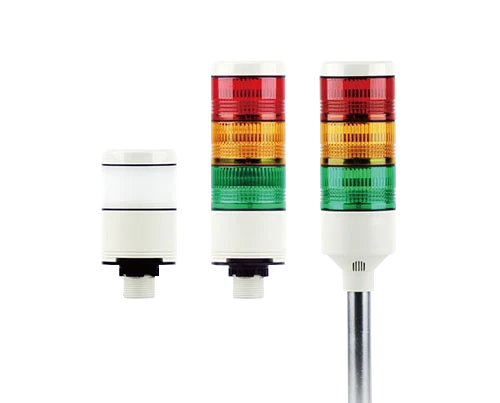
Choose a signal tower light by the states it must show, viewing conditions, controller outputs, mounting and optional sound indication.
In this article
A signal tower light displays machine or process conditions using one or more illuminated sections. Often called a stack light or andon light, it helps people notice a condition without standing directly in front of a control panel.
What is an andon light?
Andon is a term from lean manufacturing for a visual signal that shows the status of a machine or workstation and calls for help when there is a problem. In practice the andon light is usually a signal tower or stack light mounted on the machine, often with an audible option. The selection questions below apply whether the plant calls it an andon light, a stack light or a signal tower.
Define the meaning before choosing colours.
Write down the states to display and the response expected from an operator. Keep the meanings consistent across the installation and explain them in the operating instructions. Colour alone should not be the only source of critical information.
| Colour | Common convention to assess for the application |
|---|---|
| Red | A fault or condition requiring urgent attention |
| Amber | An abnormal condition or warning |
| Green | A normal or permitted operating condition |
| Blue | An operator action request |
| White | Other defined information |
These are general conventions, not a substitute for the machine’s applicable requirements. Define flashing and audible signals as carefully as steady illumination.
Check the electrical interface.
Some towers have separate inputs for each section and a shared common; others use a different control interface. Match the actual wiring diagram, supply voltage, AC/DC type and input current to the controller. Confirm compatibility with sourcing or sinking outputs where relevant.
Make the signal visible.
Assess viewing distance, ambient light, obstructions and mounting height. An audible option should suit the workplace and have a clear response assigned to it. Confirm environmental protection for the assembled tower and its mounting arrangement.
Browse Jinhong signal tower lights and include the required states, electrical interface and mounting location with an enquiry.
Write a signal-tower state schedule
Agree the signal meaning before selecting the tower configuration. Document what an operator should do when each state appears.
| Check | Information to record |
|---|---|
| Displayed state | Define the condition and the required operator response. |
| Visual or audible signal | Specify colour and steady, flashing or audible behaviour where available. |
| Controller interface | Confirm the selected tower's supply, input arrangement and common connection. |
Can two machines use the same colour for different conditions?
That can confuse operators. Define consistent meanings across the installation and explain any application-specific behaviour in the operating instructions.
Explore the products
Catalogue examples from the ranges discussed. Open a model to check its configuration and technical details.
Request model drawings and selection support