
Product guide
K16 Controls: Planning a Compact Operator Panel
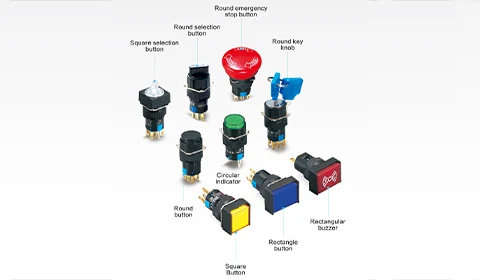
Build a K16 control schedule that distinguishes push buttons, indicator lights, selector functions and dedicated emergency-stop devices.
In this article
K16 is a family of compact controls in Jinhong’s 16mm range. Before choosing colours or head shapes, list what each panel position must do: issue a momentary command, retain a selection, display a status or provide a dedicated emergency-stop function.
Write a control schedule.
For each position, record the label, operating action and contact arrangement. Identify which signals go to a controller and which switch another device. This prevents visually similar controls from being ordered with different electrical functions.
Keep lamp requirements separate.
Indicator lights and illuminated push buttons need the correct lamp voltage and AC/DC type. Determine where the status signal comes from. A lamp connected across a supply indicates power at that point, not necessarily that an actuator or motor is running.
Check fit and maintainability.
The cut-out, allowable panel thickness and rear assembly dimensions come from the specific model drawing. Leave room between controls for wiring and service access, particularly where several contact blocks or accessories are fitted.
Use the K16 push-button range and K16 indicators to select ordinary controls. Review the dedicated K16 emergency-stop range separately when the application calls for it.
K16 panel planning example
A short control schedule helps prevent two similar-looking positions from receiving the wrong electrical configuration. Use actual machine labels in the final drawing.
| Check | Information to record |
|---|---|
| Command position | Record the action, required contacts and controller or load connection. |
| Status position | Record the condition displayed, its signal source and lamp supply. |
| Emergency-stop position | Select the dedicated device separately and refer to the machine safety specification. |
Should a status label describe the lamp colour or the machine condition?
Describe the condition the signal actually represents. Use colour to support a clear label, with meanings consistent across the installation.
Explore the products
Catalogue examples from the ranges discussed. Open a model to check its configuration and technical details.

K16 16mm Round Non-Illuminated Push Button Switch (Momentary)
View model