
Product guide
Emergency Stop Buttons: Function, Reset and Selection
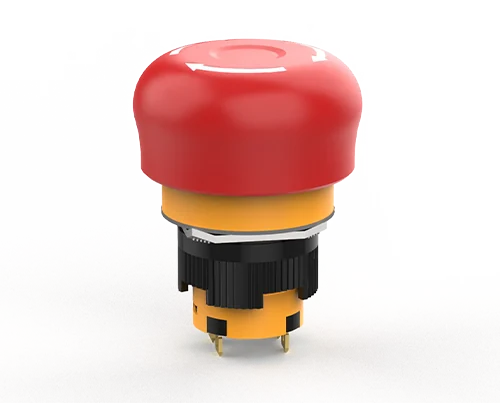
Understand emergency-stop actuators, contact characteristics and reset behaviour, and what must be checked in the complete machine design.
In this article
An emergency stop device gives a person a deliberate way to command a machine to a safe condition. It is one component inside a safety function: the button, its contacts, the wiring and the logic that acts on them are assessed together, never in isolation.
Understand what the device itself must do.
An emergency stop actuator latches when operated and stays latched until it is deliberately released. Releasing it must not restart the machine on its own; the restart is a separate, intentional act. This is why the reset method and the control logic are part of the selection, not an afterthought.
The contact block normally uses a direct opening action for the normally closed circuit, so that the contacts are forced apart by the mechanism rather than relying on a spring. Confirm this behaviour in the documentation for the exact contact block you order, because it is a property of the block rather than of the head.
Choose the head and the reset method.
A mushroom head is the recognised form, and its diameter decides how easily it can be struck. A larger head is easier to reach under stress; a smaller head suits a crowded panel or a handheld station. Colour convention is a red actuator on a yellow background, and departing from it removes the visual shorthand operators depend on.
Reset is usually by turning the head, by pulling it, or by key. A key reset restricts who may clear the condition. Decide this against the procedure people will actually follow after a stop, and make sure the chosen head supports that method.
Match the mounting size and contact count to the panel.
Mounting diameter and body depth decide whether the device fits the door and clears what is behind it. Contact count decides whether one device can serve both the stop circuit and any monitoring or signalling the design requires. The published figures below come from current JINHONG catalogue pages.
| Family | Mounting | Thermal current | Protection | Mechanical life |
|---|---|---|---|---|
| K16 (small and large head) | 16 mm | 5 A | IP40; IP65 available on request | 250,000 operations |
| 22K16 (small, large and S-type head) | Φ22 mm | 5 A | IP65 | 250,000 operations |
Note the protection figure for the 16 mm family. IP40 as standard, with a higher rating available on request, is a different proposition from a sealed device, and it is exactly the kind of detail that is assumed rather than checked. Confirm the rating for the version you actually order.
Compare emergency stop button sizes and families.
Beyond K16 and 22K16, JINHONG builds emergency stop buttons in 16, 19, 22 and 30 mm families, in plastic and in stainless steel. The figures below come from the current JINHONG catalogue; they describe the component, not the finished stop function, and the protection rating must still be confirmed for the exact version you order.
| Family | Mounting | Body | E-stop protection | Thermal current | Mechanical life |
|---|---|---|---|---|---|
| F16 | 16 mm | Plastic | IP40; IP65 on request | 5 A | 250,000 operations |
| HQ | 22 mm | Plastic | IP65 | 10 A | 250,000 operations |
| SD22 | 22 mm | Plastic | IP65 | 10 A | 250,000 operations |
| E22 | 22 mm | Plastic; plug-in or wire-lead | IP65 | 5 A | 100,000 operations |
| SD30 | 22 / 30 mm | Plastic | IP65 | 10 A | 250,000 operations |
| J16-E | 16 mm | Stainless steel | IP40; IP65 on request | 5 A | 250,000 operations |
| J19-E | 19 mm | Stainless steel | IP40; IP65 on request | 5 A | 250,000 operations |
| J22-E | 22 mm | Stainless steel | IP40; IP65 on request | 5 A | 250,000 operations |
Browse all plastic emergency stop buttons or metal emergency stop switches to see head shapes, illuminated versions and drawings.
Plan the circuit before choosing the part.
Decide how many normally closed contacts the safety function needs, whether the state must be monitored, and what device evaluates the circuit. A stop button wired to an ordinary relay does not provide the same behaviour as one evaluated by a device intended for the purpose, and the difference lives in the evaluation, not the button.
Where several stop devices are used on one machine, decide early whether they act on one function or several, and record which device covers which area. Operators need to know what a given device stops.
Position and label every device deliberately.
An emergency stop is only useful if it can be reached from where the hazard is faced. Walk the machine and identify the positions an operator actually occupies during loading, clearing a jam and setting up, then place devices so one is reachable without crossing the hazard. A device mounted where it looks tidy on a drawing is not necessarily reachable in the moment it is needed.
Mounting height and approach matter as much as position. A device behind a guard door, above a conveyor or on a surface that is routinely obstructed by work in progress may be present on the drawing and unusable in practice.
Label each device with the area it affects where a machine has more than one. Operators otherwise assume that any stop device stops everything, which is rarely how a line is zoned, and that assumption is discovered during an incident rather than before one.
Validate the complete function, not the component.
A catalogue rating for a button is not a statement about the machine. The required performance of the stop function follows from the risk assessment for the application, and it is verified on the finished installation with its actual wiring and logic. Component documentation supports that assessment; it does not replace it.
Record the verification. A stop function that was checked once during commissioning and never since is an assumption, not a control, and periodic functional testing is normally part of keeping it valid.
Information to gather before ordering
These fields let a supplier confirm that the ordered device matches the safety function it will sit inside.
| Check | Information to record |
|---|---|
| Actuator | Head form and diameter, colour, and the background it is mounted on. |
| Reset | Turn, pull or key release, and who is permitted to perform it. |
| Contacts | Number of normally closed contacts, direct opening action, and any auxiliary contact. |
| Mounting | Panel cut-out, panel thickness and rear clearance. |
| Environment | Documented ingress protection for the ordered version, and the temperature range. |
| System | The device evaluating the circuit and the validation planned for the finished machine. |
Does releasing the button restart the machine?
It must not. Releasing the actuator only clears the latched condition. Restarting is a separate deliberate action handled by the control system, and that behaviour is a property of the circuit design rather than of the button.
Is a higher contact rating a safety improvement?
No. A larger thermal current describes what the contact can carry; it says nothing about the safety performance of the stop function. That comes from the contact behaviour, the circuit and the evaluating device, assessed together on the finished machine.
What size is an emergency stop button?
The size that matters is the panel cut-out. 22 mm is the usual cut-out on control-panel doors; 16 and 19 mm families suit compact panels and handheld stations. The mushroom head is larger than the cut-out, and a larger head is easier to strike under stress. Check panel thickness and rear clearance for the exact family as well.
Plastic or metal emergency stop: which should I choose?
Plastic families such as HQ, SD22 and SD30 are listed at IP65 for the emergency stop and suit most enclosures. Stainless-steel families (J16-E, J19-E, J22-E) suit exposed or vandal-prone stations; their standard rating is IP40, with IP65 available on request, so specify the rating when you order.
Explore the products
Catalogue examples from the ranges discussed. Open a model to check its configuration and technical details.

K16 Small Head Emergency Stop Switch (Short Contact)
View model